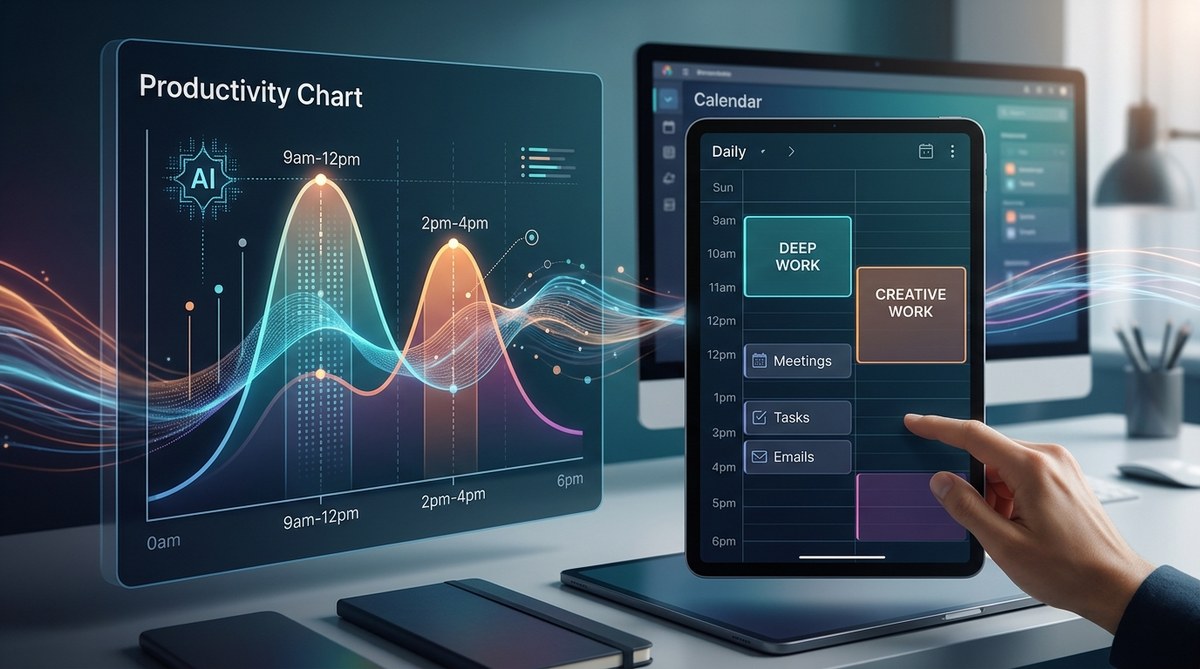
You know that feeling when you sit down to work, stare at a blank screen, and your brain just will not cooperate? You are not alone. Most knowledge workers try to force focus during their low-energy windows, then wonder why they are exhausted by lunch. The old advice was simple: wake up earlier or drink more coffee. But in 2026, we have a better option. AI tools can now analyze your actual work patterns, biometric data, and task completion rates to pinpoint your AI peak productivity hours with surprising accuracy.
AI can predict your peak productivity hours by analyzing your past performance, energy logs, and even wearable data. Instead of guessing whether you are a morning person or a night owl, you can let the machine find the pattern. Once you know your high-focus windows, you can schedule deep work there and protect those blocks from meetings and low-value tasks. This is not theory. Tools like Minetime AI already do this today.
Why guessing your peak hours is a trap
Most people assume they know their best hours. You might think you are sharpest at 8 AM because that is when you always start work. But your start time is a habit, not a signal. Real peak productivity hours are tied to your circadian rhythm, your sleep quality, and even the type of work you do.
Common mistakes people make when trying to find their productive windows:
| Mistake | Why it fails | What AI does instead |
|---|---|---|
| Relying on how you feel | Feelings are noisy and influenced by caffeine | AI measures objective output and focus duration |
| Using a fixed schedule | Your energy varies by day and season | AI adapts to your real-time data |
| Ignoring task type | You might code best at 10 AM but write best at 2 PM | AI separates peak windows by activity category |
| Only tracking work hours | Life context matters (sleep, meals, exercise) | AI integrates wearable and calendar data |
The problem with self-assessment is confirmation bias. If you believe you are a morning person, you will ignore the evidence that your best code was written at 11 PM after a nap. AI does not have that bias. It just looks at the numbers.
How AI predicts your peak productivity hours
Modern tools like Minetime AI use a combination of techniques to build your personal energy map. Here is what happens under the hood.
-
Data collection phase. The tool pulls your calendar history, task completion times, and optionally connects to your fitness tracker or sleep app. It looks for patterns in when you mark tasks as done, how long they take, and what your heart rate variability looks like.
-
Pattern recognition. Machine learning models identify clusters of high output. For example, it might notice that your most complex writing tasks consistently finish between 9 AM and 11 AM, while your administrative work scatters across the afternoon.
-
Energy curve generation. The AI creates a daily energy curve showing your peak, plateau, and recovery zones. It does not just tell you one magic hour. It shows you a gradient of focus.
-
Schedule optimization. Once the curve exists, the AI can suggest when to block deep work, when to batch meetings, and when to take breaks. It even accounts for things like lunch crashes or post-exercise clarity.
“The biggest mistake people make is treating productivity like a switch. It is a wave. AI helps you ride that wave instead of fighting it.” – Dr. Maya Chen, chronobiology researcher
A step-by-step plan to use AI for your schedule
You do not need to be a data scientist to do this. Follow these steps to start working with your AI peak productivity hours today.
-
Pick one AI tool designed for this. Start with Minetime AI or a similar platform that focuses on scheduling. Avoid general-purpose assistants that lack the specific energy-tracking features.
-
Feed it two weeks of data. The more history you give, the better the prediction. Include your calendar, to-do list completions, and any wearable data. If you do not have a wearable, you can manually log your energy every hour for a few days.
-
Review your energy curve. The tool will show you a graph. Look for the highest sustained blocks. Those are your AI peak productivity hours.
-
Protect those blocks. In your calendar, mark your peak windows as “Focus Time” or “Deep Work.” Set them to busy or private so no one can book over them.
-
Schedule your hardest tasks there. Move your most demanding cognitive work (writing, coding, strategy, analysis) into those windows. Save email, Slack, and low-focus tasks for your lower energy periods.
-
Iterate based on results. After a week, check if your output improved. The AI will also learn and adjust as you feed it more data. This is not a one-time setup.
What the data looks like in practice
Imagine a freelance writer named Sarah. She thought her best hours were 6 AM to 8 AM because that is when she had the most quiet. After two weeks of using an AI scheduler, the data showed something different. Her actual peak productivity hours were 10 AM to 12 PM. Her 6 AM writing was full of typos and rewrites. The AI suggested she move her client work to mid-morning and use early mornings for reading and research. Her output jumped 30 percent in the first month.
This is common. Many people confuse “available time” with “optimal time.” AI cuts through that confusion.
Common pitfalls when using AI to find your peak hours
Even with smart tools, you can get in your own way. Watch out for these traps.
- Ignoring the data because it contradicts your identity. If the AI says you peak at 3 PM but you always call yourself a morning person, try the AI’s schedule for a week anyway. The numbers do not lie.
- Only looking at one metric. Productivity is not just about speed. It is also about quality, creativity, and stamina. A good AI tool looks at multiple signals.
- Skipping the setup phase. You cannot get accurate results from three days of data. Give the system at least two weeks.
- Forgetting to update. Your peak hours can shift with life changes like a new baby, a new medication, or a change in exercise routine. Re-run the analysis every few months.
Combining AI prediction with time blocking
Once you know your AI peak productivity hours, you need a container for them. That is where time blocking comes in. If you are new to this, check out our guide on optimize your daily schedule with AI-powered time blocking techniques. The combination is powerful. The AI tells you when to work, and time blocking tells you what to work on during that time.
A sample schedule after AI optimization might look like this:
- 8:00 AM – 9:00 AM: Light admin, email, planning (low energy)
- 9:00 AM – 12:00 PM: Deep work on priority project (peak hours)
- 12:00 PM – 1:00 PM: Lunch and walk (recovery)
- 1:00 PM – 3:00 PM: Meetings and collaboration (moderate energy)
- 3:00 PM – 4:00 PM: Shallow tasks, learning (low energy)
- 4:00 PM – 5:00 PM: Review and wrap-up
Notice that the peak block is protected. No meetings. No Slack. Just focused work.
Tools and techniques to get started
You do not need a huge budget. Many AI scheduling tools offer free tiers. Here is what to look for.
- Calendar integration. The tool should read your Google Calendar or Outlook.
- Task completion tracking. It needs to know when you actually finish things.
- Wearable support. Optional but helpful. Heart rate and sleep data improve accuracy.
- Energy logging. If you do not have a wearable, the tool should let you manually log your energy level.
For a broader look at the ecosystem, see our list of top AI tools to boost your daily productivity in 2026. Some of these tools focus on scheduling, while others handle task management. You want the scheduling ones for peak hour prediction.
Why this matters more in 2026 than ever
Remote and hybrid work is now the norm. You have more control over your schedule than a typical office worker did five years ago. But that freedom comes with a trap. Without external structure, many people default to working whenever they feel busy, which is often the worst time for their brain. AI gives you a new kind of structure, one based on your actual biology, not on corporate norms.
The companies that adopt this approach are seeing real gains. Teams that schedule around AI peak productivity hours report fewer sick days, higher satisfaction, and better output per hour. It is not about working more. It is about working smarter.
Putting your peak hours to work
You now have the method. The next step is action. Pick one AI scheduling tool this week. Give it two weeks of honest data. Then let it tell you your real peak hours. It might surprise you. It might challenge what you thought you knew about yourself. But it will also give you back hours of wasted effort.
If you want to go deeper, read about how to let AI take over your scheduling so you can focus on deep work. That article walks through the full automation process once you trust the predictions.
Your energy is a resource, not a mystery
For years, productivity advice told you to just grind harder. That advice ignored the fact that your brain has natural rhythms. AI peak productivity hours are not a gimmick. They are a practical tool for anyone who wants to do their best work without burning out.
Start small. Run the experiment. See what the data says about you. Then build your schedule around it. Your future self will thank you for it.