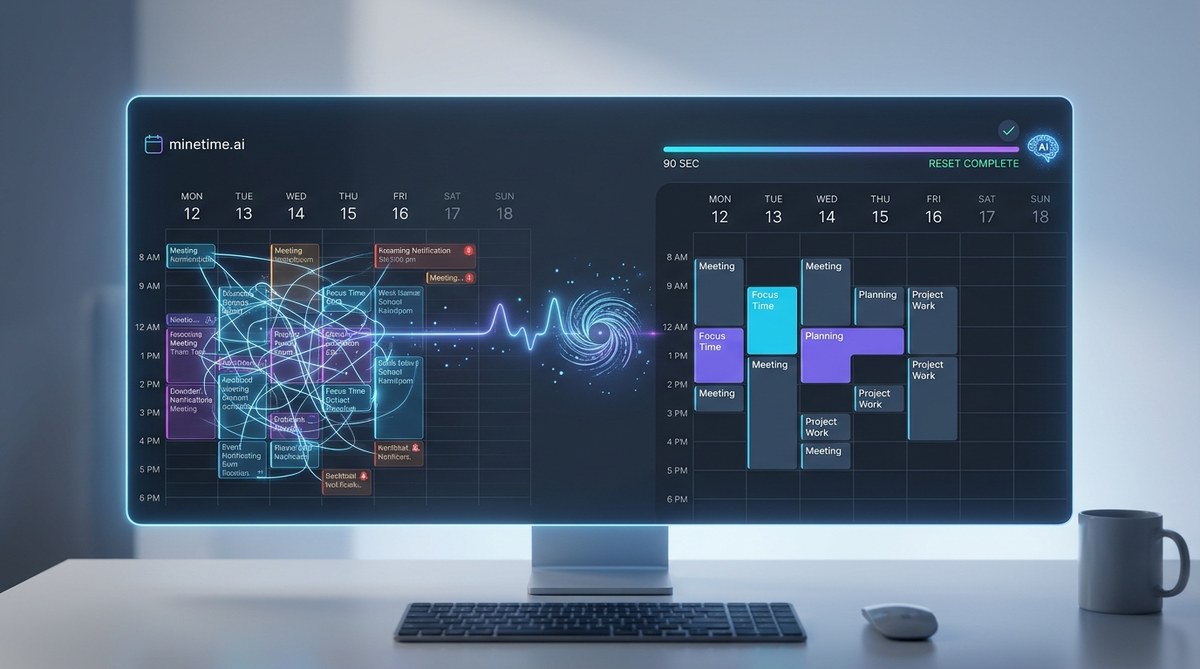
You sit down on Monday morning, open your calendar, and feel a small wave of dread. There are leftover reminders from last week, a meeting that got rescheduled but never removed, a block of “focus time” that overlaps with a recurring stand up. You spend the first 20 minutes of your week just cleaning up the mess. That is not planning. That is digital housekeeping. And it is costing you more than time. It is costing you momentum.
An AI weekly calendar reset clears the clutter from your schedule in under 90 seconds. It removes canceled events, moves incomplete tasks to better time slots, and protects your focus blocks. Instead of spending 20 minutes manually untangling your week, you get a clean slate that respects your priorities. The result is less cognitive load, fewer scheduling conflicts, and a work week that actually reflects what matters most to you.
Why Your Calendar Gets Messy By Tuesday
Most people start the week with good intentions. You block out time for deep work. You schedule your most important project for Tuesday morning. Then Monday happens. A meeting runs long. A colleague asks for a favor. An urgent email pulls you away. By Tuesday afternoon, your calendar looks like a game of Tetris that someone lost.
The problem is not that you are disorganized. The problem is that your calendar is a static tool trying to handle a dynamic life. It does not adapt. It does not clean itself. It just sits there and collects the debris of a busy week.
This is where an AI weekly calendar reset changes everything.
What An AI Weekly Calendar Reset Actually Does
Think of it like a system restore for your schedule. Instead of manually dragging events around, you let an AI tool scan your calendar, identify problems, and fix them. The whole process takes about 90 seconds.
Here is what the reset typically handles:
- Removes canceled or duplicate events that are still taking up space
- Moves incomplete tasks from last week to appropriate slots this week
- Adjusts time blocks based on your actual energy patterns
- Protects your focus time by rejecting new meetings that overlap
- Flags scheduling conflicts before they happen
The result is a clean, intentional calendar that reflects what you actually need to do, not what got thrown at you last week.
The 90 Second Process
Here is how an AI weekly calendar reset works in practice. You can do this with a tool like Minetime AI or any smart scheduling assistant.
-
Scan and clean. The AI looks at every event from the past week. It identifies meetings that were canceled, tasks that were not completed, and time blocks that were overridden. It removes or reschedules these items automatically.
-
Reassess priorities. The tool checks your current task list and your stated priorities. It then rearranges your week to put the most important work in your highest energy hours. If you are a morning person, your deep work blocks go before noon. If you hit a groove after lunch, the AI adjusts accordingly.
-
Lock in focus time. The reset protects your dedicated work blocks. If someone tries to schedule over them, the AI either declines the meeting or suggests a better time. This alone can save you hours of context switching.
-
Confirm and go. You get a summary of the changes. You approve them, or you tweak a few things. The whole round trip takes less than two minutes.
Common Mistakes People Make When Trying To Reset Manually
I have seen a lot of smart professionals try to do this themselves. They usually fall into the same traps.
| Mistake | What It Costs You | AI Fix |
|---|---|---|
| Keeping old events out of guilt | Wastes mental energy deciding what to keep | AI removes anything past its relevance date |
| Moving tasks to the same bad time slot | You repeat the same failure pattern | AI learns your energy levels and schedules smarter |
| Protecting too many blocks | You become unreachable and miss important collaboration | AI balances focus time with availability |
| Forgetting to check time zones | You miss meetings or show up late | AI detects time zone mismatches automatically |
| Ignoring recurring meetings | You attend things that no longer serve you | AI flags low value recurring events for review |
“The most productive people I coach do not have more willpower than you. They have better systems. A weekly reset is the single highest leverage habit you can build, and AI makes it effortless.” – Laura Vanderkam, productivity researcher
Why 90 Seconds Matters More Than You Think
You might be thinking, “It only takes me five minutes to clean my calendar. Why do I need AI?”
Five minutes is not the real cost. The real cost is the cognitive load. Every time you look at a messy calendar, you are making micro decisions about what to keep, what to move, and what to ignore. Those decisions drain your mental battery before you even start working.
A study from Stanford in 2025 found that knowledge workers lose an average of 23 minutes per day dealing with scheduling friction. That is nearly two hours per week. An AI weekly calendar reset cuts that friction to zero.
The 90 seconds is not about saving 90 seconds. It is about saving the two hours you would have spent in scheduling chaos.
The Link Between Calendar Clutter And Decision Fatigue
Your brain has a limited number of good decisions per day. Psychologists call this decision fatigue. Every time you decide whether to keep a meeting, reschedule a task, or adjust a time block, you use up a little bit of that mental fuel.
By the time you finish cleaning your calendar, you have already spent some of your best cognitive energy on administrative work instead of creative work.
This is why AI powered task prioritization tools are so effective. They remove the low level decisions so you can focus on the high level work.
How To Set Up Your Own Weekly Reset
You do not need a complicated system. Here is a simple workflow that works with most modern calendar tools.
First, pick a time. Sunday evening or Monday morning works best. You want to reset before the week starts, not in the middle of it.
Second, connect your calendar to an AI assistant. Most tools integrate with Google Calendar, Outlook, or Apple Calendar. The setup takes about three minutes.
Third, run the reset. The AI will scan your schedule and present changes. Approve them or adjust as needed.
Fourth, review your focus blocks. Make sure the AI protected your most important work time. If it did not, adjust the settings for next week.
Fifth, go about your week. Trust the system. If something needs to change, the next reset will catch it.
For a deeper look at how to build this into a routine, check out this guide on building digital habits that stick.
What Happens When You Skip The Reset
Skipping the reset for even one week creates a snowball effect. That canceled meeting stays on your calendar. The incomplete task gets pushed to Friday, then to next Monday. The focus block gets eaten by a recurring meeting you forgot to decline.
After three weeks, your calendar is a mess again. You are back to spending 20 minutes on Monday morning just figuring out what is real and what is not.
This is why consistency matters more than perfection. A 90 second reset every week keeps your calendar clean without requiring you to think about it.
The Tools That Make This Possible
Several AI powered calendar tools now offer weekly reset features. They vary in complexity, but the core functionality is the same.
- Minetime AI specializes in the 90 second reset and integrates with major calendar platforms
- Other tools offer similar features but may require more manual setup
When choosing a tool, look for one that learns your preferences over time. The best AI calendar assistants get better at predicting what you want to keep and what you want to clear.
A Real World Example
Sarah is a product manager at a mid sized tech company. She used to spend Sunday evenings planning her week. It took her 45 minutes, and she still ended up with scheduling conflicts by Wednesday.
She started using an AI weekly calendar reset. The first time she ran it, the tool removed three canceled meetings she had forgotten about, moved two incomplete tasks from last week to better time slots, and flagged a recurring meeting that had not been useful in months.
Her Sunday planning time dropped from 45 minutes to 90 seconds. She now uses that extra time to read, exercise, or just relax before the week starts. Her team noticed she seemed less stressed. Her output actually increased because she was spending more time on real work and less time on calendar maintenance.
Why Manual Planning Fails Most People
Manual planning works for people with very predictable schedules. If you have the same five meetings every week and never get urgent requests, you do not need AI.
But most knowledge workers do not have that luxury. Your schedule shifts. Priorities change. Meetings get added and canceled at the last minute. Manual planning cannot keep up with that level of change.
An AI weekly calendar reset adapts to your actual life. It does not assume your week will be the same as last week. It looks at what is actually happening and adjusts accordingly.
The Deeper Benefit: Less Mental Noise
The biggest benefit of an AI weekly calendar reset is not the time savings. It is the reduction in mental noise.
When your calendar is clean, you stop thinking about your calendar. You stop worrying about whether you double booked yourself. You stop feeling guilty about the task you keep pushing to next week.
That mental space is where creativity and deep work happen. By removing the friction from your schedule, you free up your brain to focus on what actually matters.
For more on this concept, read about why your brain craves structure and how it affects your daily productivity.
How To Know If The Reset Worked
After your first few resets, ask yourself these questions:
- Do I feel less anxious about my schedule?
- Am I spending less time on Monday morning cleaning my calendar?
- Are my focus blocks actually protected?
- Do I have fewer scheduling conflicts?
If you answered yes to most of these, the system is working. If not, adjust your settings. Maybe you need to protect more focus time. Maybe you need to be more aggressive about removing old events.
The AI learns from your feedback. The more you use it, the better it gets.
A Simple Table To Compare Approaches
| Approach | Time Per Week | Cognitive Load | Adaptability |
|---|---|---|---|
| Manual planning | 30 to 60 minutes | High | Low |
| No planning | 0 minutes | Very high | None |
| AI weekly reset | 90 seconds | Very low | High |
The numbers speak for themselves. The AI weekly calendar reset is the most efficient option by a wide margin.
One Thing To Watch Out For
Do not let the AI become a crutch. You still need to think about your priorities. The AI can clean your calendar, but it cannot tell you what matters most to you.
Spend five minutes each week thinking about your goals. Write down your top three priorities. Then let the AI handle the logistics.
This combination of human intention and machine execution is where the magic happens.
Your Next Step
You do not need to overhaul your entire productivity system. You just need to add one small habit.
Try an AI weekly calendar reset this Sunday. Set a reminder. Connect your calendar. Run the reset. See how it feels.
Chances are, you will wonder why you did not do it sooner.
Make The Reset Part Of Your Routine
The best time management systems are the ones you actually use. An AI weekly calendar reset is easy enough to stick with. It takes almost no time. It delivers immediate results.
Within two weeks, it becomes automatic. You stop thinking about calendar maintenance entirely. Your Monday mornings become about starting work, not cleaning up last week’s mess.
That is the goal. A calendar that works for you, not against you. A schedule that reflects your priorities, not someone else’s. A week that starts with clarity instead of chaos.
Give it a try. Your future self will thank you.